Manage Your Money in Your Preferred Currency
Choose your main currency and personalize your financial settings with Saviora. Organize your income, expenses, budgets, and savings goals with a financial experience tailored to your preferences.

Account Settings
Manage your profile, preferences, and security settings
Your Finances, Your Currency
In Saviora's Localization settings, you can choose a supported main currency that matches how you plan and track your finances. Once saved, your account applies the configured currency formatting across your financial summaries, transaction logs, active budgets, and savings milestones.
Choose Your Main Currency
Select your preferred currency symbol and denomination from the available options in Account Settings. Set the primary currency standard for your entire Saviora workspace.
Review Your Financial Activity
Review all your income entries, daily expense transactions, remaining budget balances, and savings goal targets formatted cleanly using your selected main currency.
Personalize Your Settings
Easily revisit Settings at any time to adjust your main currency, accounting cycle, or regional timezone whenever your personal finances or location evolve.
See How Your Amounts Format in Different Currencies
Tap any supported currency below to see how Saviora applies the currency symbol and formatting to your financial metrics:
Display Note: Main currency selection configures symbol and number formatting for your account views. It does not automatically recalculate past recorded values through live FX conversions.
Configure in SavioraMore Than Currency Settings
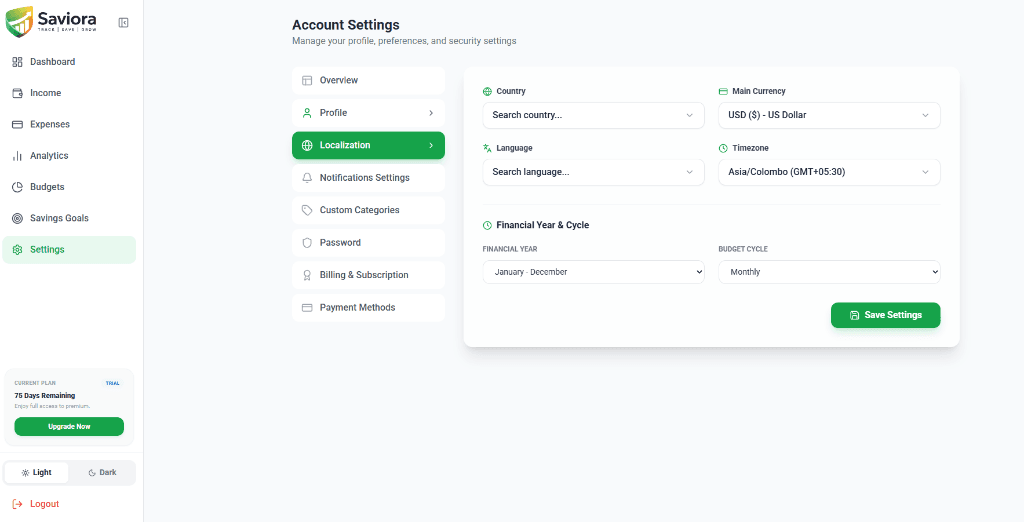
Saviora provides a complete suite of regional controls within Settings → Localization. Each preference is managed independently—allowing you to combine your preferred country, currency, timezone, language, and budget cycles to match your unique financial life.
Country
Select your residence country from a searchable global list. Configures country-level regional reference for your profile without forcing restrictions on your currency or language.
Main Currency
Set your account's primary currency code and symbol. Governs how money figures appear across your overview dashboard, category budgets, expense streams, and savings targets.
Language
Choose your preferred interface language. Read navigation menus, button labels, and system notifications in the language most comfortable for you.
Timezone
Configure your exact GMT/UTC timezone offset so all transaction dates, daily spending logs, and recurring budget resets align precisely with your local day.
Financial Year
Select your 12-month fiscal accounting period (such as calendar year January to December) to align financial overviews with personal or professional tax calendars.
Budget Cycle
Define the recurring cycle for your spending budgets. Plan category allocations and evaluate limit utilization on your preferred pacing.
See Your Finances More Clearly
Review your financial activity across Saviora, including income, expenses, budgets, savings goals, and financial analytics.

75 Days Remaining
$1,156.35
Net for October 2026$2,392.00
Current month earnings$1,235.65
Current month spending$7,131.25
Total goal contributionsIncome vs Expenses
Financial Health
SCORE
Your health score is calculated based on monthly savings vs expenses ratio.
Recent Transactions
VIEW ALLSalary Deposit
15 Oct 2026 · Direct Deposit
Monthly Housing
10 Oct 2026 · Wire Transfer
Food & Groceries
08 Oct 2026 · Card Payment
Active Budgets
VIEW ALLFinancial Overview Dashboard
High-level monthly summaries showing your net balance, total income, current spending, and overall savings formatted with your configured currency.
Income & Cash Inflows
Monitor earnings across salary, freelance work, investments, and side hustles in the currency you use to plan your livelihood.
Expense Tracking & Budgets
Record everyday expenses and keep category budgets (such as groceries, transport, housing) organized under one clear financial denomination.
Savings Goals & Milestones
Define target milestone figures and track cumulative contributions toward emergency funds, travel, or major purchases.
Personal Finance Management That Fits Your Region
Personal financial realities vary around the world. Saviora provides modular localization controls so you can structure your money management according to how you actually earn, budget, and live.
Remote Workers & Freelancers
If you live in one country but invoice clients or receive income in USD, EUR, or GBP, Saviora allows you to track your money in your primary billing currency without location lockouts.
Expatriates & Global Living
Relocating across borders? Keep your preferred budgeting currency intact or adjust your timezone and country independently whenever your living arrangements change.
Flexible Fiscal Year Alignment
Align your annual summaries with your local tax or personal accounting schedule (such as calendar years or custom fiscal calendars) alongside tailored budget cycles.
Accurate Localized Timestamps
With timezone configuration (e.g. Asia/Colombo GMT+05:30), transactions and budget period boundaries register in your exact local time, avoiding day-shift discrepancies.
Straightforward & Transparent Personal Finance
Saviora is crafted for clear personal income tracking, expense categorization, and budget planning. We do not claim universal banking integrations, localized tax compliance, or live automated currency conversion across world currencies. Instead, we provide reliable, customizable financial tracking that puts you in direct control of your numbers.
Set Up Your Currency in a Few Simple Steps
Personalizing your financial currency in Saviora takes less than a minute. Follow these four straightforward steps directly in your settings screen.
Open Settings
Navigate to Settings in the Saviora sidebar navigation menu.
From your main account screen, click 'Settings' at the bottom of the navigation bar to access Account Settings.
Select Localization
Click the Localization tab under Account Settings.
In the settings submenu, click 'Localization' (identified with the globe icon) to open your regional preference controls.
Choose an Available Option in Main Currency
Open the Main Currency dropdown and choose your currency.
Select from supported global options such as USD ($), EUR (€), GBP (£), or other supported currencies that match your bookkeeping.
Save Settings & Verify Your Displays
Click 'Save Settings' and review your updated dashboard.
Click the green 'Save Settings' button. Your choice is instantly saved and your dashboard, budgets, and savings goals update their currency formatting.
Configure Your Currency Now
Start tracking your finances with complete clarity. Create your Saviora account today and personalize your localization settings in seconds.
Start Your 90-Day Pro Trial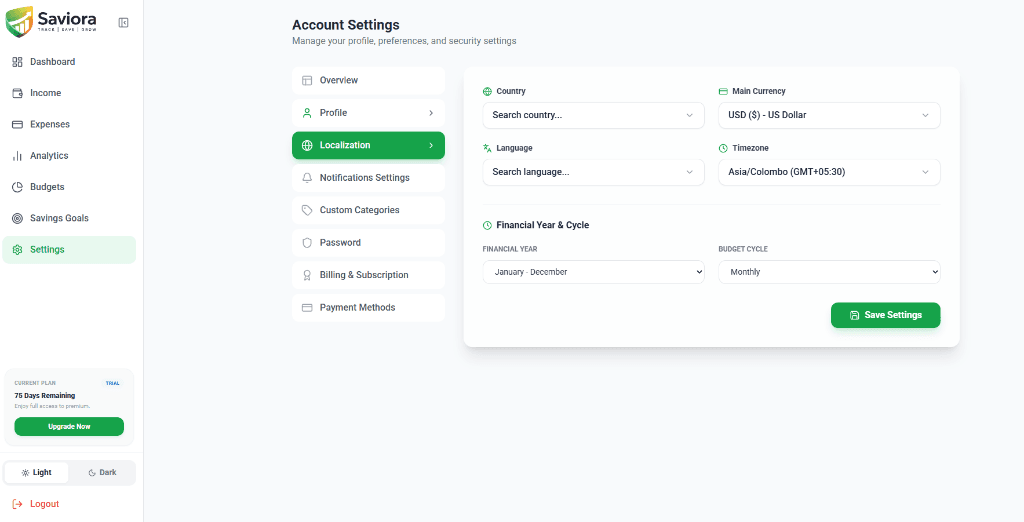
Multi-Currency Management FAQs
Direct, transparent answers regarding currency settings, formatting, historical records, and regional configurations in Saviora.
Make Saviora Work for Your Financial Preferences
Choose your available regional settings and organize your income, expenses, budgets, and savings goals with Saviora.
 All-in-One Finance